Table of contents:
- How HTTP/1.1 separates one request from the next
- Where the body ends
- One request, two paths
- Where HTTP/1.1 comes from when the browser sent HTTP/2
- Headers the proxy adds
- Cache poisoning and cache deception
- A web server does more than serve files
- Why the conditions matter more than the CVE headline
- The version in the header can lie
- Sources
The series has 20 parts:
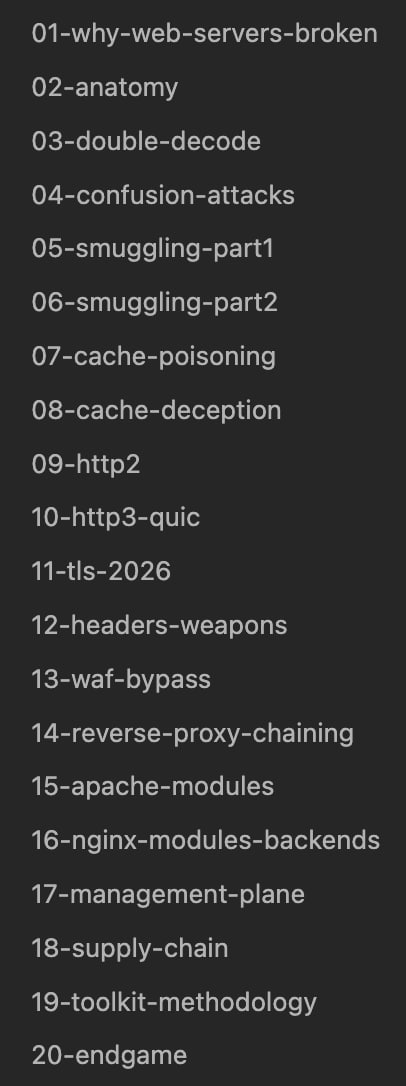
I found out recently that people built Claude Code skills from the JWT series and even reported valid bugs to a few bug bounty programs. Now let’s look at web servers: what they do with a request before it reaches the application, and where we can break that process.
This series assumes a black-box bug bounty target: the site, your own test accounts and the ability to send requests. There is no access to the target’s configuration, server logs or running processes. We study the internals to choose a byte to change, understand which server decision it might affect and identify a result visible from outside.
During a pentest, the owner may provide configuration, logs or host access. Those checks are marked separately and can also be performed in your own lab. For example, you can record HTTP requests and responses between the proxy and application, or enable debug logging to see the path before and after each rewrite rule.
Burp’s request history, the browser’s Network tab and your own Collaborator records remain available during black-box testing. They show your sent requests, received responses and requests made to your unique test address. They do not reveal intermediate values inside the target’s servers.
When you open a site, the request often passes through several programs before it reaches the application:
browser -> CDN -> WAF -> load balancer -> nginx -> application
The CDN accepts the connection on one of its servers and can return a cached response. The WAF checks the request against rules intended to block attacks. The load balancer picks a server from a pool. Nginx serves a file itself or passes the request to the application. These are roles, not necessarily separate machines: a CDN can also provide the WAF and load balancing. There are simpler setups too, with only nginx in front of the application.
Take the browser connecting to the CDN. Nginx never sees that connection at all. The CDN accepts the browser’s request itself, parses it and decides what to do next: block it, answer from its cache, or forward it to the next server.
If the request has to go further, the CDN opens a separate connection to nginx or reuses an existing one. What it sends is not necessarily the same bytes it received from the browser. The browser may have sent HTTP/2, while the CDN builds an HTTP/1.1 request for nginx: a line with the method and path, headers, and a body. The next proxy parses that request and may build another one for the application.
Here is an ordinary HTTP/1.1 request:
POST /api/users HTTP/1.1
Host: example.com
Content-Length: 20
Content-Type: application/json

{"name":"pingiskok"}
A parser has to pull the method POST, the path /api/users, three headers and a JSON body out of it. Ambiguities show up already here. What do you do when Content-Length and Transfer-Encoding arrive together? When do you decode %2F in the path? What about two Host headers?
Suppose the WAF decides that the request is for a public section of the site and lets it through. The application reads the path differently and opens the admin panel. The WAF checked a different path from the one the application used. This becomes a bypass if the application does not deny access itself.
We will start with four decisions that can differ between these programs:
- The path - who decoded
%2F, and at which hop. - The body length - where a node thinks one request ended and the next began.
- Infrastructure headers - who added
X-Forwarded-ForandX-User, and who trusted them. - The cache key - which request fields the CDN uses to select a stored response.
How HTTP/1.1 separates one request from the next
First, let’s look at how a server reads HTTP/1.1. The first line in the example is called the request line:
POST /api/users HTTP/1.1
It holds three values separated by spaces: the method POST, the resource /api/users and the protocol version HTTP/1.1. Headers follow, one per line.
In an editor, each line appears to end with an ordinary line break. In an HTTP/1.1 message, that break consists of two bytes: 0d 0a in hex. The first is CR, “carriage return”, the second is LF, “line feed”. Together they are written as \r\n, or CRLF. With HTTPS, these bytes become visible after TLS decryption, not directly in a captured network packet. One more CRLF follows the last header, so the end of the headers looks like two pairs in a row:
POST /api/users HTTP/1.1\r\n
Host: example.com\r\n
Content-Length: 20\r\n
Content-Type: application/json\r\n
\r\n
{"name":"pingiskok"}
The empty line ends the headers and nothing else. If the request has a body, the server still has to work out its length. Here Content-Length: 20 tells it to read the next 20 bytes. The JSON really is 20 bytes, because every character in it is single-byte. Byte twenty-one can already be the start of the next request.
TCP carries a continuous ordered stream of bytes, not ready-made HTTP requests. There is no marker in it saying “the first request ended here”. The server finds the CRLFs itself, parses the headers and computes the body length. When several requests travel over one persistent connection, they sit back to back with no extra delimiter.
Where the body ends
After the headers, the server has to determine how many bytes belong to the body. HTTP/1.1 normally uses one of two ways:
Content-Length: 100- exactly 100 bytes follow the empty line;Transfer-Encoding: chunked- the body arrives in pieces, each preceded by its size.
Chunked is for when the sender does not know the final length yet, for example when the application generates the response as it goes. Each chunk’s size is written as a hex number. After it come CRLF, that many bytes, and one more CRLF. A zero-sized chunk marks the end. Here are the same rules on a two-chunk body:
4\r\n
Wiki\r\n
5\r\n
pedia\r\n
0\r\n
\r\n
The body here is Wikipedia. First four bytes Wiki, then five bytes pedia. The sequence 0\r\n\r\n says there are no more chunks and no trailers.
A sender must not set Content-Length and Transfer-Encoding at the same time. A server that receives such a request may reject it outright. RFC 9112 also allows parsing the body by Transfer-Encoding alone, but the connection still closes after the response. A proxy that does forward the request has to strip Content-Length first.
Suppose the first server breaks these rules: it uses Content-Length but also forwards Transfer-Encoding. The second server uses chunked framing. They can then assign different body lengths to the same sequence of bytes. This is CL.TE: the left side names the first server’s framing method, the right side the second server’s. The attack requires a particular pair of implementations that disagree this way. A normal modern nginx rejects a request with recognised Content-Length and Transfer-Encoding: chunked headers together with 400.
This is particularly dangerous when the proxy uses one persistent connection to the application for requests from different users. If the application server leaves part of the first request unread, it starts parsing the next request from those bytes. An attacker can leave the beginning of a request there, with another user’s request appended to it. This class of attacks is called request smuggling; the disagreement about request boundaries is often called a desync. Part 5 contains practical examples.
In 0.CL, zero means that the first server treats the body as empty, while the second expects the length in Content-Length. For example, the first server may fail to recognise the header because of how it is written, yet forward it to the second server. The first is already waiting for a response; the second is still waiting for the body. Each is waiting for the other. Parts 5–6 cover specific causes of this behaviour and the conditions that let the attack continue.
In CL.0, the roles are reversed. The first server forwards the body according to Content-Length, while the second responds without reading all of it and incorrectly treats the leftover bytes as a new request. An early response is not a vulnerability on its own: the server can finish reading the body or close the connection. The danger is reusing a connection with an unread body. There is also client-side desync, where the confusion occurs on the connection between the browser and server. That variant does not need a connection shared by multiple users. More on this in parts 5–6.
HTTP parser fixes and strict validation of incoming requests close specific variants of these attacks. If all participants support HTTP/2, it is also worth removing the conversion to HTTP/1.1 between the proxy and application. This removes the described ways of splitting a shared HTTP/1.1 byte stream differently, but does not replace updates or header validation.
So Server: nginx tells us neither “smuggling is possible” nor “everything is fixed here”. From outside, the first check is whether one request of our own can change how the next is handled. Connection reuse and different body-parsing rules explain a possible cause. The Server header alone does not show how the proxy exchanges requests with the application. Parts 5–6 also explain how to distinguish this effect from an accidental timeout.
One request, two paths
The first place the programs can disagree is the path. The client sends:
GET /admin%2Fusers HTTP/1.1
Host: example.com
%2F represents the byte /: the % is followed by its hexadecimal code, 2F. Suppose the WAF blocks paths starting with /admin/ and checks the string before decoding it. /admin%2Fusers does not have that prefix, so the WAF lets it through. The application decodes %2F, gets /admin/users and selects the user-list handler.
If only the WAF protected access to that handler, the restriction has been bypassed. If the application checks permissions itself and returns 403, this access-control bypass does not work.
I send /admin/users, then /admin%2Fusers, keeping cookies and other headers unchanged. If the first request is denied and the second returns the same handler’s data, the encoded slash bypassed the restriction. In this setup, only the WAF enforces it, before forwarding the request to the application.
An application that checks the role or object owner after resolving the URL can still deny access. Changing / to %2F does not remove that check. Access to another account’s report could change if the modified path selects a different handler without the check, for example. Decoding alone is insufficient.
Here the WAF checked the original string and the application checked the decoded one. In other cases, both decode the path, but one does it twice. For example, %252F becomes %2F after one pass and / after two. Part 3 covers which transformations change the meaning of a path and how to distinguish ordinary URL handling from a vulnerability.
Where HTTP/1.1 comes from when the browser sent HTTP/2
Different programs can also disagree about the body length. This can happen between two HTTP/1.1 servers or when converting HTTP/2 to HTTP/1.1. Let’s look at the second case: why the browser considers a request complete while nginx is still waiting for data, or has already started reading the next request.
The browser can connect to the CDN over HTTP/2 while the CDN connects to nginx over HTTP/1.1:
browser --HTTP/2--> CDN --HTTP/1.1--> nginx
HTTP/2 carries the same method, path, headers and body, but splits the data into frames. A frame is a sequence of bytes with its own header. Its first nine bytes contain the length of the data that follows, the frame type, flags and stream identifier. The receiver does not have to search for a line break to find the end of the frame: it reads the specified number of bytes.
A stream groups the frames belonging to one request and its response. For example, a frame with stream identifier 1 belongs to the first request, while a frame with identifier 3 belongs to another. Frames from these streams can be interleaved on one connection. The receiver distinguishes them by their identifiers. Part 9 examines the fields byte by byte and what happens when a stream closes.
An ordinary request uses two main types:
HEADERSstarts the block containing the method, path and headers;CONTINUATIONframes carry the rest when the block does not fit;DATAcarries the body.
The headers inside HEADERS are compressed with HPACK, which replaces repeated names and values with references into tables. So the diagram below shows the decompressed content, not the literal bytes from the wire:
HEADERS, stream 1, END_HEADERS
  :method    = POST
  :scheme    = https
  :authority = example.com
  :path      = /api/users
  content-type = application/json

DATA, stream 1, END_STREAM, length 20
  {"name":"pingiskok"}
Fields that start with a colon are called pseudo-headers. They replace what HTTP/1.1 kept in the request line and in Host. :method holds POST. :path holds the path together with the query string after ?, for example /search?q=nginx. :authority holds the domain and, if one is given, the port. :scheme on an ordinary site is http or https.
The END_HEADERS flag means the header block is over, while the request itself can continue - the body comes next. The end of the whole request is marked by the END_STREAM flag. It usually sits on the last DATA. With no body it goes on the first HEADERS; if trailers follow the body, it goes on their HEADERS.
In HTTP/2 nobody looks for an empty line to find the end of a request, and Content-Length does not split the stream into frames. The receiver takes each frame’s length from the frame itself. The END_STREAM flag says the sender is done with the request. A content-length header is allowed in HTTP/2, but its value has to match the body bytes carried across all DATA frames. Frame headers and optional padding are not part of that count. When the numbers disagree, the proxy must reject the request instead of forwarding it.
In this example, the browser speaks HTTP/2 to the CDN, while the CDN uses HTTP/1.1 to nginx. The second connection’s protocol is configured independently of the first. The frames above become a request such as:
POST /api/users HTTP/1.1
Host: example.com
Content-Type: application/json
Content-Length: 20

{"name":"pingiskok"}
During that rewrite the pseudo-headers become the request line and Host, and the contents of the DATA frames become the body. HTTP/1.1 needs a separate statement of where the body ends. The CDN can count the bytes and write Content-Length, or send the body in pieces with Transfer-Encoding: chunked.
The vulnerability appears if the proxy fails this check: it copies an understated content-length from the client’s request but forwards more body bytes. For example, it writes Content-Length: 5, then sends the five bytes hello followed by GET /admin HTTP/1.1\r\n.... The proxy treated that text as part of the HTTP/2 body. For the HTTP/1.1 server, the body ended after hello, and the following bytes can start another request.
This is a bug in a particular implementation, not normal CDN behaviour or an inevitable property of HTTP/2. James Kettle described such a case on Netflix in 2021. It is called H2.CL: the first server finds the boundary using HTTP/2, the second using Content-Length. Part 9 covers the full request, the exploitation conditions and the related H2.TE variant.
Headers the proxy adds
The third place the programs can disagree is in headers added by infrastructure. With a proxy in front, the application does not see the browser’s original connection. The proxy therefore adds its own headers:
X-Forwarded-For- the client’s address;X-Forwarded-Proto- whether the client came over HTTP or HTTPS;X-Forwarded-Host- which site name it asked for;X-UserorX-Email- who an auth proxy such as oauth2-proxy has already checked.
The trouble starts when the client can send the same header itself. Say the application lets the user named in X-User into the admin panel because it treats that header as the result of the proxy’s check. The proxy has to delete the client’s X-User and write its own. If it just passes X-User: admin through, the application believes a string the attacker wrote.
An existing profile page or the API the site uses to retrieve the current user is a suitable place to check.
In this design, the application must accept the identity value only from a trusted proxy that replaces the client’s value. A direct route to the application must not bypass that protection.
Host diverges the same way. RFC 9112 requires a 400 response when a request carries more than one Host, but in practice nodes choose differently: some take the first, some the last, some join the values with a comma. A disagreement here has the same effect as with %2F. The WAF checked one domain and the application served another. I cover attacks on Host and X-Forwarded-Host in part 12.
Cache poisoning and cache deception
A CDN can fetch a page from the application once and serve the stored response to later visitors. It selects that response by a cache key built from request fields. Suppose the key for https://example.com/news contains only the scheme, hostname and path. Other headers are outside the key in this example.
I send a request for /news with X-Forwarded-Host: attacker.example. If the application trusts this header, it may insert a link to attacker.example into the HTML. If the CDN stores that response, an ordinary request for /news without the supplied header gets the same cache key and the same page. The visitor receives a response changed by the attacker. This is cache poisoning. Both conditions are needed: the header affects the response, and the cache does not distinguish requests with and without it.
In web cache deception, the attacker causes a private response to be stored. The application might treat /account/profile.css as the signed-in user’s profile, while the CDN treats the .css suffix as a reason to cache it. Disclosure occurs if the response is stored and subsequently returned to a client without that user’s session. The extension alone does not establish either condition. Parts 7 and 8 explain the tests for these two attacks.
A web server does more than serve files
Parsing bugs are only part of the problem. Two installations of the same nginx version can have different modules, settings and package patches. Modules and neighbouring services add other functions:
- WebDAV creates and modifies files over HTTP;
- FastCGI hands requests to PHP-FPM;
- AJP links Apache to Tomcat;
- Lua and njs run code inside the web server itself;
- a control panel edits the config and restarts the service;
- metrics exporters, such as nginx-prometheus-exporter, expose measurements of server activity over HTTP; log collectors also have their own ports and routes.
The presence of a module is not enough to exploit it. We need to check whether a request can reach the vulnerable code and which settings it requires. For example, CVE-2023-25690 in Apache requires particular RewriteRule or ProxyPassMatch rules, not just a loaded mod_proxy. But “we don’t use that module” is no substitute for checking the configuration either: its handler may be enabled through shared configuration or another virtual host.
Panels such as nginx-ui, Plesk and cPanel let you administer the server, so access to them is checked separately from the site. Traefik’s built-in dashboard works differently: it and its associated API let you view routes and active configuration. It does not rewrite nginx’s configuration, but exposing it can still reveal internal addresses and settings. I cover control panels and service interfaces in part 17.
Why the conditions matter more than the CVE headline
A CVE number lets you find the description, affected versions and fix. The number alone does not tell you whether a particular installation is vulnerable. Let’s look at a few cases.
Apache 2.4.49 and 2.4.50
CVE-2021-41773 affected the handling of dots and encoded path characters in Apache 2.4.49. In a certain configuration Alias mapped a URL to a directory on disk, and an encoded ../ let you climb out of that directory and read other files.
Only the files not covered by the usual Require all denied from the default configuration were readable. Code execution needed an additional condition: the file you reached had to fall under CGI and be executed as a program. The fix in Apache 2.4.50 turned out to be incomplete, and the bypass got CVE-2021-42013. Both bugs were closed in 2.4.51.
Confusion Attacks in Apache
In 2024 Orange Tsai showed several bugs where Apache modules confused the URI, the filename on disk and the assigned handler. The conditions vary: one needs mod_rewrite, another mod_proxy, CGI, PHP or Windows. The common name covers several different bugs, and each fires in its own configuration. I cover the full mechanics of Confusion Attacks in part 4.
Request smuggling in ASP.NET Core
CVE-2025-55315 affected specific versions of ASP.NET Core behind an intermediary server. The proxy and Kestrel parsed the end of a chunked request differently, so the remainder of one request could stick to the next one on a shared connection. Part 6 explains the mechanism.
QUIC in HAProxy
In February 2026 HAProxy fixed two bugs you can reach only with QUIC enabled. In CVE-2026-26080 the handling of a truncated number in a packet looped. The watchdog, which detects when the process stops making progress on other work, then killed it. In CVE-2026-26081 the token length check in an initial QUIC packet crashed the process. The advisory describes remote denial of service for both CVEs. I cover both in part 10.
The version in the header can lie
Installations differ in configuration, compiled modules, build options and package patches. The string nginx 1.x does not reveal that combination.
Debian and Red Hat often backport a fix to an older version of a program without changing its main version number. During a pentest with host access, check the full package version against the distribution’s advisory, and the build against the module list. From outside, the banner helps select CVE conditions to investigate.
For example, the nginx advisory for CVE-2026-42533 describes a buffer overflow involving map and regular expressions. Once an advisory like this is published, an earlier recommendation that “this version is safe” needs to be reconsidered: the bug was already there, but was not yet known. Part 20 has a version summary with its verification date. When checking your own installation, compare the package against a current advisory instead of relying only on the table in the article.
Part 2 follows a request through nginx and Apache: how they select the site, apply processing rules and choose a file or application. That explains why the same URL can produce different results under different configurations.
Sources
- Apache HTTP Server 2.4: published vulnerabilities
- Orange Tsai: Confusion Attacks in Apache HTTP Server
- nginx: official security advisories
- nginx: request parsing and rejection of conflicting body-length headers
- Traefik: API and dashboard
- PortSwigger: preventing request smuggling
- Microsoft: CVE-2025-55315 in ASP.NET Core
- RFC 9112: HTTP/1.1 parsing rules
- RFC 9112, section 3.2: several
Hostheaders in one request - RFC 9113: HTTP/2 frames, streams and rules
- James Kettle: research on attacks against the HTTP/2 to HTTP/1.1 conversion
- James Kettle: “HTTP/1.1 must die” - 0.CL and early-response gadgets
- James Kettle: browser-powered desync - CL.0 and client-side desync
- HAProxy: CVE-2026-26080 and CVE-2026-26081